TEquIP
A Connected Platform for Operational Workflows
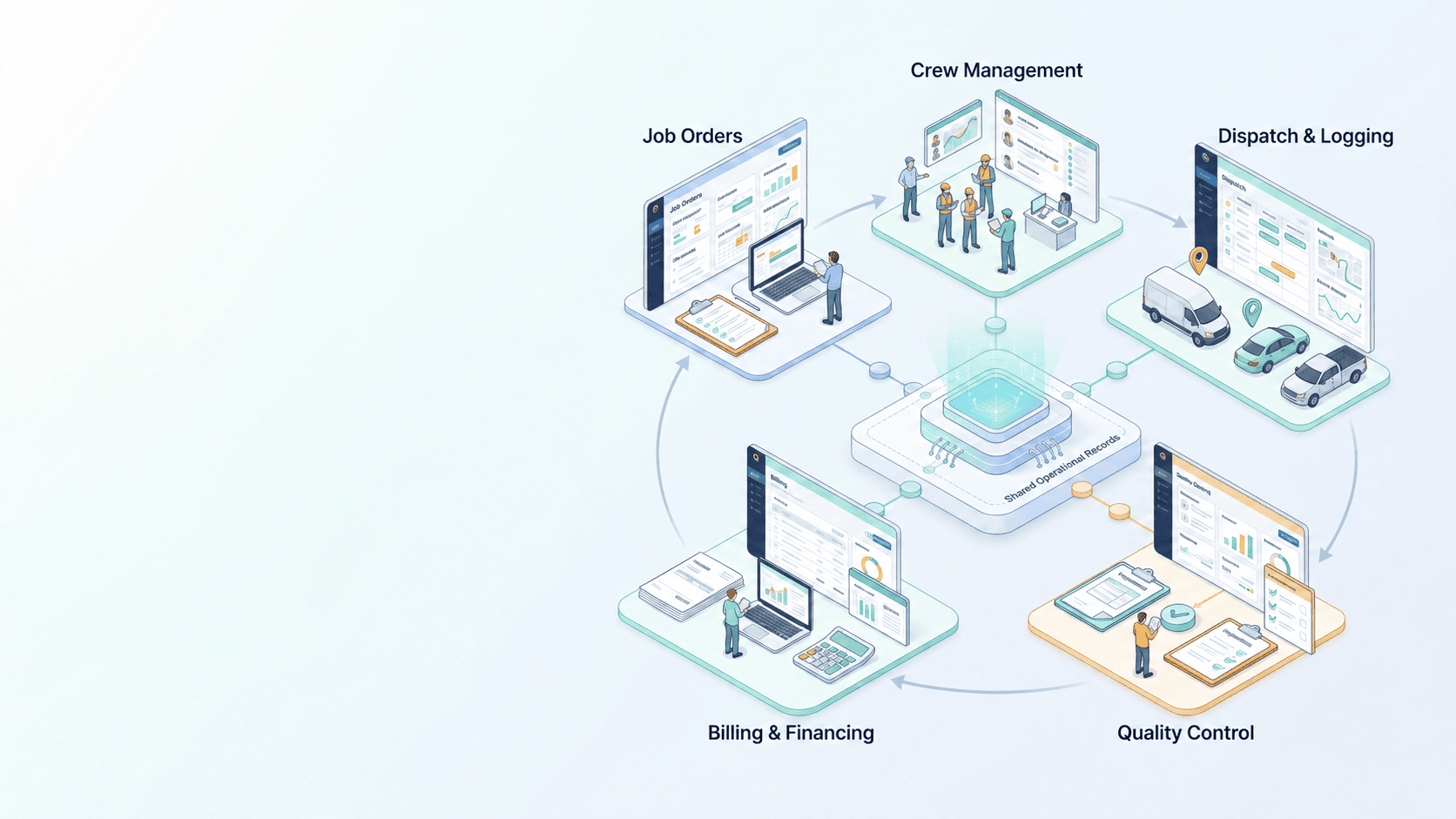
TEquIP — Total Equipment Integration Process — brings job orders, crews, billing, quality, and dispatch together in five integrated modules that work from the same underlying records.
Request a DemoOverview
One Connected Platform for Field and Equipment Operations
TEquIP — Total Equipment Integration Process — is the connected platform behind Donato's field and equipment operations modules. Instead of separate tools for job tracking, crew coordination, billing, quality, and dispatch, TEquIP keeps them working from the same underlying records.
Each module stands on its own, but the real value shows up in how they connect: a job order created in one module carries through to crew assignment, billing, and quality review, without re-entering the same information twice.

TEquIP Modules
Five Integrated Modules, One Platform
Each module works on its own, and each one strengthens the others — job orders feed crew assignments, completed work feeds billing, and quality and dispatch stay tied to the same record throughout.
TEquIP
Total Equipment Integration Process
- Module
Job Order Maintenance
Create, assign, and track service jobs from request to completion.
Module details - Module
Crew Maintenance
Coordinate crew assignments, availability, and work history.
Module details - Module
Billing & Financing
Connect completed job orders to billing and financial records.
Module details - Module
Quality Control
Build quality checks and review into every job order.
Module details - Module
Dispatch & Logging
Coordinate dispatch and log field activity in real time.
Module details
Illustrative Workflow
How the Modules Work Together
An example of how one job order can move across TEquIP’s modules, each building on the same record.
Job Order Maintenance
A service request becomes a structured job order with a status, an owner, and a history.
Crew Maintenance
Crew availability is used to route the job order to the appropriate crew or technician.
Dispatch & Logging
The crew is dispatched, and field activity is logged against the job order as work progresses.
Quality Control
Completed work is reviewed, with any issues flagged before the job order is finalized.
Billing & Financing
The completed job order carries over to a billing record, without re-entering its details.
TEquIP Module
Job Order Maintenance
Every service job tracked from request to completion.
Job Order Maintenance is the operational core of TEquIP: every service request becomes a trackable job order, moving through assignment, execution, and close-out inside one connected system. Instead of jobs living across phone calls, spreadsheets, and paper tickets, each one has a status, an owner, and a history that the rest of the TEquIP suite can build on.
What This Module Handles
Centralized Job Creation
Log new job orders with the details a crew needs to act — location, scope, priority, and requester — in one consistent format.
Assignment & Ownership
Route job orders to the right crew or technician and keep a clear record of who owns each job at every stage.
Status Tracking
Move jobs through defined stages — open, assigned, in progress, completed — so anyone checking in sees accurate, current status.
Job History & Records
Keep a complete record of each job order's lifecycle, available for reference on future work at the same site or account.
Searchable Job Log
Find past and active job orders quickly by site, crew, status, or date instead of digging through disconnected files.
How it works
- Request Comes InA service need is logged as a new job order with the relevant site and scope details.
- Job Order CreatedThe request becomes a structured job order in the system, ready for assignment.
- Crew AssignedThe job order is routed to the appropriate crew or technician based on location and scope.
- Work Performed & UpdatedStatus is updated as the job moves through progress, keeping the record current.
- Job Closed OutCompleted work is marked closed, leaving a finished record available for future reference.
Why it matters
- Nothing gets tracked by memory or paper — every job has a record.
- Clear ownership means fewer jobs stall waiting on 'who has this?'
- Consistent status tracking gives accurate answers when customers or managers check in.
- A searchable job history supports faster decisions on repeat or related work.
TEquIP Module
Crew Maintenance
Coordinate crews with clear assignments and availability.
Crew Maintenance keeps crew information organized in one place — who's available, what they're assigned to, and what they've worked on. It gives dispatchers and managers a clear, current picture of the workforce so job orders can be assigned to the right people without relying on separate lists or memory.
What This Module Handles
Crew Records
Maintain organized records for each crew or technician, including role and assignment history.
Availability Visibility
See who is available, assigned, or unavailable at a glance before assigning new work.
Assignment Coordination
Match crews to job orders based on availability and location, reducing scheduling guesswork.
Work History by Crew
Review what a given crew or technician has worked on, useful for accountability and planning.
Team Organization
Group crews and technicians in a structure that matches how field operations are actually run.
How it works
- Crew OnboardedA crew or technician is added to the system with their role and details.
- Availability SetCurrent availability is recorded so dispatch has an accurate picture.
- Assigned to a JobJob Order Maintenance draws on this availability to route work appropriately.
- Work TrackedAssignments and progress are reflected against the crew's record as work happens.
- History MaintainedCompleted assignments build a work history available for future reference.
Why it matters
- Assign work based on real availability, not outdated lists.
- Managers get a clear picture of the workforce without extra phone calls.
- Crew work history supports fairer, better-informed assignment decisions.
- Coordination stays consistent as crews and job volume grow.
TEquIP Module
Billing & Financing
Completed work, connected to billing and financial visibility.
Billing & Financing connects completed job orders to the financial side of the business. Because it draws on the same job order records created in Job Order Maintenance, billing reflects the work that was actually done — without duplicating data entry or reconciling separate systems after the fact.
What This Module Handles
Job-Linked Billing
Generate billing records directly from completed job orders instead of re-entering job details separately.
Financial Record Keeping
Maintain organized billing and financial records tied back to the job orders that produced them.
Status-Aware Billing
Billing reflects a job order's actual completion status, reducing mismatches between billed and completed work.
Account-Level Visibility
Review billing activity by account or site to support accurate, organized financial reporting.
How it works
- Job Order CompletedA job order is marked complete in Job Order Maintenance.
- Billing Record GeneratedThe completed job's details carry over to a billing record.
- Details ReviewedBilling information is reviewed for accuracy against the job order.
- Invoice PreparedThe reviewed billing record supports invoicing to the customer or account.
- Financials RecordedThe finalized billing activity is kept as part of the account's financial history.
Why it matters
- Billing reflects completed work without duplicate data entry.
- Fewer mismatches between what was done and what was billed.
- Financial records stay organized and tied back to real job history.
- Account-level visibility supports cleaner reporting.
TEquIP Module
Quality Control
Quality checks built into every stage of operations.
Quality Control brings review and verification into the job order workflow itself, rather than treating quality as a separate step handled elsewhere. Because it connects to the same job order records the rest of TEquIP uses, quality checks can be tied directly to the work they're reviewing.
What This Module Handles
Job-Linked Quality Checks
Tie quality review directly to the job order it applies to, keeping context in one place.
Review Tracking
Record review outcomes so completed work has a documented quality check, not just a completion status.
Issue Flagging
Flag job orders that need follow-up or correction before they're considered fully closed.
Quality History
Maintain a record of quality outcomes over time, useful for spotting recurring issues.
How it works
- Job Order Reaches ReviewA job order nearing or at completion is queued for quality review.
- Review PerformedThe completed work is checked against expected quality standards.
- Outcome RecordedThe review result is logged against the job order's record.
- Issues Flagged if NeededAny problems found are flagged for follow-up before final close-out.
- Job Order FinalizedOnce quality is confirmed, the job order's record reflects a completed, reviewed status.
Why it matters
- Quality review happens as part of the workflow, not as an afterthought.
- Issues get flagged before a job order is considered fully closed.
- A documented quality history supports accountability and improvement.
- Review data stays connected to the job it applies to.
TEquIP Module
Dispatch & Logging
Real-time visibility into field operations.
Dispatch & Logging coordinates the day-to-day movement of crews in the field and keeps a running log of that activity. Because dispatch decisions and log entries connect back to job orders and crew records, the rest of the TEquIP suite reflects what's actually happening in the field.
What This Module Handles
Dispatch Coordination
Direct crews to job orders as they come in, based on availability and location.
Activity Logging
Maintain a running log of field activity tied to job orders and crew assignments.
Job-Linked Records
Keep dispatch and log entries connected to the job order and crew they relate to, not siloed separately.
Operational Visibility
See current field activity across active job orders in one place.
How it works
- Job Order Ready for DispatchA job order with an assigned crew becomes ready for field dispatch.
- Crew DispatchedDispatch coordinates crew movement to the job site.
- Activity LoggedField activity is logged against the job order as work progresses.
- Status ReflectedLogged activity keeps the job order's status current for anyone checking in.
- Job Order UpdatedThe completed dispatch and log history remain part of the job order's record.
Why it matters
- Field activity is logged where it connects to the job it belongs to.
- Dispatch decisions are based on current crew availability, not guesswork.
- Operational visibility stays current as jobs move through the day.
- Activity history supports review and planning after the fact.
See TEquIP In Action
Request a demo to see how TEquIP and its five modules fit into your operations.